


You head out sailing, look at the display and the speed reads 0.0 knots. Or it jumps around for no reason, or gets stuck on one value. It's one of the most common faults on Raymarine ST60 displays (and on the ST40), and it can almost always be fixed. Here's how to find the cause step by step.
First: is it only the speed that fails?
A Tridata display shows speed, depth and temperature. If the depth works normally and only the speed fails, the display is most likely fine and the problem may be on the speed log side: the paddlewheel, the transducer or its cable. If several readings fail at once, check the power supply and the instruments' SeaTalk connections first.
Bear in mind that in many installations the water temperature is measured by the speed log transducer itself. If speed and temperature fail at the same time, suspect the transducer or its cable.
Symptom and most likely cause
| What you see | Most likely cause |
| Always reads 0 | Paddlewheel jammed by fouling, cut cable or faulty transducer |
| Reads, but drops to 0 now and then | Dirty paddlewheel that slows down, or corroded connector |
| Jumps around or shows impossible values | Poor connection or interference on the cable |
| Always reads too high or too low | Display calibration set incorrectly |
1. Dirty or jammed paddlewheel (the number one cause)
The speed log paddlewheel is always in the water and within a few weeks it fills up with algae and barnacles. A little dirt is enough to slow it down or stop it turning altogether.
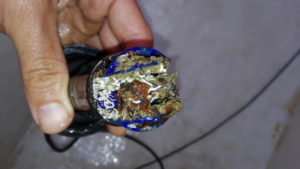
How to check: remove the transducer from the through-hull fitting (with the blanking plug at hand) and spin the paddlewheel with your finger. It should turn smoothly without catching. If someone watches the display while you spin it, they should see the speed go up. We explain the whole process in How to clean your boat's speed log.
2. Damaged paddles or shaft
If the paddlewheel is clean but has a broken paddle or the shaft has play, it will turn badly or not at all. Paddlewheels and shafts are usually sold as spare parts, so you don't always need to replace the whole transducer.
3. Cable and connector
Check the cable from the transducer to the back of the display: make sure it isn't crushed, cut or pinched where it passes through a bulkhead. Also look at the display terminals: with the damp on board it's common to find green corrosion on the contacts. Clean them and tighten them again.
4. Calibration
If the speed works but always reads too high or too low, it isn't a fault: you need to adjust the display's calibration factor. Compare it with a GPS on a day with no current and correct the value following your ST60 manual. Note: with current, the speed log and the GPS never match, and that's normal. We explain why in GPS speed log or paddlewheel log: what each one measures.
5. Faulty transducer
If the paddlewheel turns well, the cable is in good condition and the display still registers nothing when you spin it by hand, the transducer's internal sensor has most likely failed. In that case it needs replacing.
What if you forgot about the paddlewheel for good?
If you're tired of cleaning, dismantling and replacing parts, there's another option: let the speed come from the GPS. The sailoQ cube-micro generates the same pulse signal as the speed log and connects to the SPEED input of your ST60, so the display keeps working exactly as before. With nothing in the water to get dirty.
It's just three wires and you can keep the water temperature reading. It's all explained in How to install and calibrate your sailoQ on a Raymarine ST40 or ST60.